Synthetic test accounts only · Do not upload identifiable patient information · iPhone supports browser photo capture in this test
SECURE SIGN-IN · TEST ENVIRONMENT
Welcome back.
Sign in with the account your clinic provided. Patient access requires a private invite.
Synthetic test accounts · PIN 9999
CARE TEAM
Capture and review
A focused workspace for the next wound photo.
Test data only
P
Ready for capture
Patient options
STEP 1
Take the photo
Use phone camera or choose a photo
For a clear photoKeep the whole wound in frame. Use even light and hold the camera straight-on. For area readings, include the 20 mm marker beside it on the same flat plane.
First-time glasses setup
Use the single WoundB Capture Android app for this visit and glasses capture. The WoundB website in Chrome cannot access the glasses camera. Meta AI stays installed for pairing and first-time approval; the photo then goes straight from the glasses app to the WoundB server.
Glasses capture is Android-only in this test. iPhone users can take or choose a phone photo.
Use WoundB Capture for glasses. The latest app download and browser choice are on the WoundB start screen.
Practice without taking a photo
Photo preview
New captureOriginal image preserved after receipt
▧
No photo selected
Choose a capture source above. The image will stay here until you save it.
STEP 2
Measure the outline
No measurement
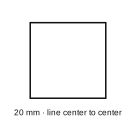
Place the printed 20 mm square beside the wound on the same flat surface. Set the scale, then trace the edge once.
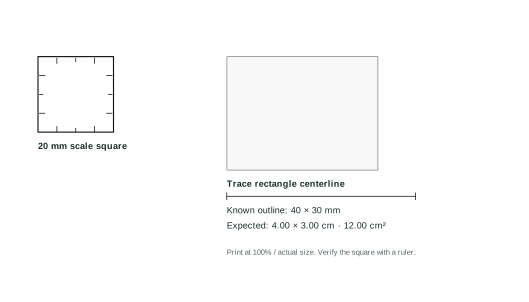
Print the test card at actual size. Capture it flat, set the scale from the 20 mm square, then trace the rectangle’s centerline. Expected: 4.00 × 3.00 cm and 12.00 cm².
Save the photo to start. Zoom in if needed, then tap the center of the 4 marker corners.
About accuracy and depth
The displayed dimensions are calculated only from your manual outline and the 20 mm marker. WoundB does not identify wounds or reject objects automatically. Only continue when a clinician confirms the visible wound edge, a sharp image, and a flat marker on the same plane. Curved skin or an oblique view can make the result unreliable.
A 2D photo cannot measure wound depth. This test feature is not clinically validated.
Clinician note Optional · copied into EMR draft
Saved with this reviewed measurement. Leave blank if not needed.
READY TO REVIEW
EMR measurement note
Draft
RECENT ACTIVITYCapture historyVerified server receipts
No captures received yet.
YOUR WOUND UPDATE
Send a photo to your care team.
They will match and review it before it becomes part of your care record.
Test data only
PHOTO UPDATE
One clear photo is enough
1 of 2
1
Use a bright room and show the whole wound.
2
Hold the camera straight above. Include a marker if your care team gave you one.
Photo ready
PATIENT PORTAL
Create your WoundB account.
Your clinic sent you a private, one-time sign-up link. Use an email you can access.